
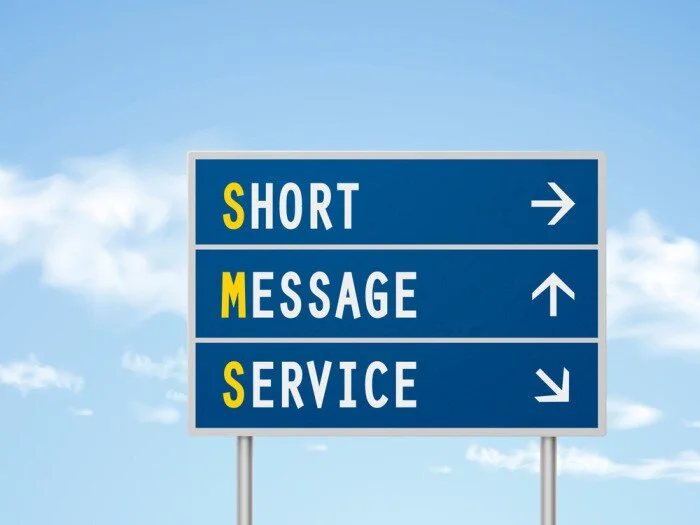

Have you ever seen the letters “SMS” in a text message, phone setting, or verification notification? You may have wondered what they mean. SMS is a common term in mobile communication, but many people do not know what the letters stand for or how the service works.
The sms meaning in text is usually Short Message Service. It is the technology traditionally used to send short text messages between mobile phones. When someone asks you to send an SMS, they usually mean a regular text message sent through a mobile phone service.
However, SMS can be confusing when it appears in different places. You might see it in your phone settings, a message from your bank, a business notification, or a social media comment. This guide explains what SMS means, how it differs from modern messaging apps, why phones use it, and how to understand it in everyday conversations.
What Does SMS Mean in Text?
SMS stands for Short Message Service. It is a mobile messaging service that allows people to send text messages through a cellular network. It is one of the original technologies behind traditional mobile texting.
In everyday language, people often use SMS and text message to mean almost the same thing. For example, if someone says, “I will send you an SMS,” they mean they will send you a text through their phone’s messaging service.
SMS is different from slang abbreviations such as LOL, BRB, and IDK. Those terms express reactions or shorten common phrases. SMS names a messaging service instead.
What Do the Letters S, M, and S Stand For?
Each letter in SMS represents part of the full name:
- S: Short
- M: Message
- S: Service
Together, the words describe a service designed to send short written messages. People usually pronounce SMS by saying each letter separately: “S-M-S.”
Is SMS an Acronym or Internet Slang?
SMS is an initialism because people normally pronounce its letters separately instead of reading them as one word. It is also commonly described as an abbreviation.
SMS is not generally considered modern internet slang. It is a technical term that has become part of everyday language. You may see it in messages between friends, but it is especially common in phone settings, business notifications, and conversations about mobile technology.
For example, someone might write, “I got an SMS from my bank.” They are explaining that their bank sent a text message. They are not using a special expression or describing an emotion.
SMS Meaning in Everyday Conversations
In regular conversations, SMS usually refers to a standard mobile text message. The exact meaning depends on the sentence, but the basic idea remains the same.
Here are some examples of how people use SMS in everyday communication.
| Example | Meaning |
| “I will send you an SMS.” | I will send you a text message. |
| “Did you get my SMS?” | Did you receive my text? |
| “Check your SMS inbox.” | Look for a text message on your phone. |
| “The code came by SMS.” | The code arrived in a text message. |
| “My plan includes free SMS.” | My mobile plan includes text messaging. |
These examples show that SMS is usually a simple way to refer to mobile texting. People may use the full term when discussing phone plans or technology. In casual conversations, they are more likely to say “text” or “text message.”
SMS vs. Text Message: Is There a Difference?
The terms are closely related, but they are not always identical in a technical sense. SMS is the name of a particular messaging service. A text message is a general term people use for a written message sent by phone or through a messaging app.
For example, a message sent through traditional SMS uses the SMS service. A message sent through WhatsApp usually travels through the internet instead. People may call both of them texts, even though they use different technologies.
In everyday speech, saying “text me” is perfectly normal. You do not need to say “send me an SMS” unless you want to be more specific about the messaging method.
How Does SMS Work?
SMS allows a phone to send a short written message to another phone number. The message travels through the mobile carrier’s messaging system and is then delivered to the recipient’s device.
You usually do not need to install a separate app to send a traditional SMS. The messaging app that comes with your phone can handle it, provided your phone and mobile service support SMS.
Here is a simple explanation of the process:
- You open your phone’s messaging app.
- You enter the recipient’s phone number or choose a contact.
- You type your message and press send.
- Your phone sends the message through the mobile messaging service.
- The recipient’s phone receives the message when delivery is possible.
The process usually takes only a few seconds. However, delivery may take longer if the network is busy, the recipient’s phone is unavailable, or there is a problem with the mobile service.
Does SMS Need the Internet?
Traditional SMS generally does not require a mobile data connection or Wi-Fi. It uses the mobile carrier’s messaging service. This is one reason SMS can be useful when internet access is unavailable.
However, you still need suitable mobile service and a phone plan or service that supports texting. Having no internet does not automatically mean every SMS will be delivered. If you have no usable cellular connection, sending or receiving messages may fail or be delayed.
Internet messaging apps work differently. Apps such as WhatsApp usually need an internet connection to send and receive messages. Depending on the app and your connection, that internet access may come from Wi-Fi or mobile data.
How Many Characters Can an SMS Contain?
A traditional SMS message can contain up to 160 characters when it uses the standard GSM-7 character set. This limit helped shape the short writing style associated with early texting.
Some characters and writing systems use a different encoding. In those cases, a single message may have a lower character limit, such as 70 characters. Longer messages can often be divided into multiple parts and displayed together by the receiving phone.
Because messages once had strict limits, people developed short forms such as “u” for “you,” “gr8” for “great,” and “c u l8r” for “see you later.” These shortcuts made it easier to fit a complete thought into a short message.
SMS vs. MMS: What Is the Difference?
SMS and MMS are both associated with mobile messaging, but they serve different purposes. SMS traditionally handles text messages. MMS stands for Multimedia Messaging Service and supports multimedia content, such as pictures and videos.
For example, sending “I will be there in ten minutes” as a traditional text is an SMS. Sending a photo through a carrier’s multimedia messaging service may use MMS instead.
| Feature | SMS | MMS |
| Full form | Short Message Service | Multimedia Messaging Service |
| Main purpose | Traditional text messages | Messages with media, such as pictures or videos |
| Typical content | Plain text | Text plus supported multimedia |
| Character limits | Traditionally 160 characters per standard message segment | Limits depend on the carrier and service |
| Internet requirement | Usually uses the mobile carrier’s messaging service | Usually depends on carrier support and may use mobile data |
| Common use | Quick updates and verification codes | Sharing photos and other media through carrier messaging |
Exact behavior depends on your phone, messaging app, and carrier. Modern phones may also use internet-based messaging features, so not every photo or group message follows the same route.
What About RCS Messaging?
RCS stands for Rich Communication Services. It is a newer messaging standard designed to provide features that traditional SMS does not offer on its own.
Depending on the device, carrier, app, and available support, RCS can offer features such as read receipts, typing indicators, higher-quality media sharing, and improved group chats. These features can make texting feel more like using a modern messaging app.
RCS is not simply another name for SMS. It is a separate messaging standard. If RCS is unavailable, a messaging app may offer SMS as a fallback, depending on its settings and the devices involved.
Why Does My Phone Say “Sent as SMS”?
If your phone displays “Sent as SMS,” it usually means your message was sent through traditional SMS instead of the internet-based messaging service you expected to use.
For example, Apple’s iMessage sends messages over the internet between supported Apple devices. If iMessage is unavailable and SMS fallback is enabled, an iPhone may send a message as SMS instead. The exact behavior depends on your settings, network, and the recipient’s device.
Possible reasons for an SMS fallback include:
- The internet connection is unavailable or unreliable.
- The recipient does not have the same internet messaging service enabled.
- The recipient’s device or account does not support that service.
- Your phone’s messaging settings allow messages to fall back to SMS.
- The messaging service is temporarily unavailable.
Seeing “Sent as SMS” does not automatically mean something is wrong. It simply tells you that a different delivery method was used. However, the status alone does not guarantee that the recipient has read the message.
What Do Green and Blue Message Bubbles Mean?
On an iPhone, blue bubbles usually indicate messages sent through iMessage. Green bubbles indicate messages sent through a carrier-based service, such as SMS or MMS, or through RCS where supported.
The color tells you which messaging service is being used. It does not reveal the other person’s feelings, whether they are ignoring you, or whether they have read your message. Check the message status and your app’s settings if you need more information.
Does SMS Have a Slang Meaning on Instagram or TikTok?
Most of the time, SMS means Short Message Service, even when it appears in a casual conversation. It is not a widely established slang term in the same way as LOL, TBH, or IMO.
You may come across claims that “sms” means “so much sauce” or “so much swag” in social media comments. These interpretations may appear in particular groups or conversations, but they are not universal meanings. There is no single slang definition that every Instagram or TikTok user will understand.
If someone comments “sms” under an outfit photo, they might be using a local or personal abbreviation to praise the person’s style. But you should not assume that meaning without considering the surrounding conversation. They could also be referring to text messaging or using the letters in another way.
How Can You Understand SMS in Social Media Comments?
Look at the context before deciding what the letters mean. The topic of the post, the words around the abbreviation, and the relationship between the people can help you understand the intended message.
| Where You See SMS | Most Likely Meaning |
| “I sent you an SMS.” | A traditional text message |
| “Enter the SMS code.” | A code sent through text messaging |
| “Our company uses SMS alerts.” | Text notifications sent to mobile phones |
| “SMS me when you arrive.” | Send me a text message |
| “SMS” under a fashion photo | Unclear without more context; possibly a community-specific expression |
If you still cannot work out the meaning, it is fine to ask, “What do you mean by SMS?” A quick question is better than guessing and misunderstanding the other person.
What Is SMS Language?
SMS language is the shortened writing style that became popular with traditional mobile texting. People often call it “textese.” It includes abbreviations, shortened words, numbers used in place of sounds, and other ways of writing messages quickly.
Early mobile phones often had small keypads. Typing a full sentence could take time, and traditional SMS messages had character limits. Short forms helped people communicate with fewer keystrokes and fit more information into a message.
Many of these expressions are still common, even though modern phones make typing easier. People keep using them because they are familiar, quick, and useful in casual conversations.
| Abbreviation | Full Meaning | Example |
| LOL | Laughing out loud | “That video was funny lol.” |
| BRB | Be right back | “brb, I need some water.” |
| IDK | I don’t know | “idk what time it starts.” |
| TBH | To be honest | “tbh, I liked the first movie more.” |
| TTYL | Talk to you later | “I have to go now. ttyl!” |
| OMG | Oh my God | “omg, that was unexpected!” |
| GR8 | Great | “The concert was gr8.” |
| CU L8R | See you later | “Thanks for today. cu l8r!” |
These shortcuts are useful in relaxed conversations, but they are not always suitable for professional messages. When emailing a teacher, applying for a job, or contacting a customer, complete words usually create a clearer and more respectful impression.
Does SMS Language Hurt Writing Skills?
Using abbreviations in messages does not automatically mean someone has poor writing skills. Many people switch between casual and formal writing depending on the situation.
For example, a person might write “idk, see u soon” to a friend but use full sentences in a school assignment. The important skill is knowing when each style is appropriate.
Problems can happen when a reader does not know an abbreviation or when casual shortcuts make an important message unclear. For important communication, clear wording is usually the safest choice.
Where Is SMS Still Used Today?
Messaging apps have changed how people communicate, but SMS remains useful. It can reach many mobile phones without requiring both people to use the same messaging app. Businesses and organizations also use it to send short, time-sensitive information.
Here are some common uses of SMS today.
Verification Codes
Websites and apps may send a temporary verification code by SMS when you sign in, create an account, or confirm a phone number. You enter the code to help complete the verification process.
Never share a login or verification code with someone who contacts you unexpectedly. A scammer may try to trick you into handing over access to your account.
Bank and Payment Alerts
Banks and payment services may send SMS alerts about transactions, account activity, or security events. These messages can help customers notice activity that needs attention.
Be careful with messages that claim your account is locked and urge you to click an unfamiliar link. Contact your bank through its official app, website, or phone number if you are unsure whether a message is genuine.
Appointment Reminders
Doctors’ offices, salons, repair services, and other businesses may send reminders by SMS. A message might confirm an appointment, provide its time, or ask you to reply if you need to change it.
Delivery Updates
Delivery companies and online stores may send text updates when a package is on its way or ready for collection. These alerts make it easier to follow an order without opening an app every time.
Still, unexpected delivery messages can be used in scams. If a message asks for payment or personal details, verify it through the company’s official tracking service before taking action.
Business Notifications and Marketing
Businesses use SMS to send order confirmations, appointment updates, reminders, and promotional offers. This is often called SMS marketing when the messages are used to promote products or services.
Responsible businesses should follow applicable messaging and privacy rules. If you receive unwanted promotional texts, look for a legitimate way to unsubscribe or contact the business through its official channels.
Is SMS Safe and Private?
SMS is convenient, but it has security limits. Traditional SMS is not end-to-end encrypted by default. This means you should not treat ordinary text messages as the safest place to share highly sensitive information.
SMS can still be useful for everyday communication and account alerts. However, its security depends on the mobile network, your phone, and the situation. Phone-number attacks, such as SIM swapping, can also allow criminals to receive messages intended for you.
Follow these simple safety tips when using SMS:
- Do not share verification codes with other people.
- Avoid sending passwords or highly sensitive information through ordinary text messages.
- Check links carefully before opening them.
- Do not trust a message just because it appears to come from a familiar company.
- Use an authenticator app or a passkey when a service offers a suitable, secure option.
- Contact the organization through its official website or app if a message seems suspicious.
SMS-based verification can be better than having no additional account protection, but it is not the strongest option for every situation. If you have a choice, consider the more secure methods recommended by the service you use.
Advantages and Disadvantages of SMS
SMS remains popular because it is simple and widely supported. However, it also has limits compared with modern messaging services.
| Advantages | Disadvantages |
| Works with many basic and modern mobile phones | Traditional SMS has a limited message length per segment |
| Usually does not require mobile data or Wi-Fi | Requires suitable cellular service |
| Does not usually require a separate messaging account | Does not offer end-to-end encryption by default |
| Useful for alerts and verification codes | Messages may be delayed or fail to arrive |
| Can reach people without the same chat app | International and other messaging charges may apply |
| Simple to use for short updates | Rich media and advanced chat features are limited |
For a quick update, SMS may be all you need. For sharing high-quality photos, sending large files, or having a feature-rich group conversation, an internet-based messaging service may be more convenient.
SMS Around the World
SMS is recognized in many countries, although people may use different words when talking about it. In some places, “SMS” is common in everyday speech. In others, people are more likely to say “text message” or simply “text.”
For example, someone might say, “Send me an SMS when you arrive,” while another person might say, “Text me when you get there.” Both requests usually mean the same thing: send a short written message to a phone number.
Charges can differ between mobile plans and countries. Before sending texts while traveling, check your carrier’s international messaging rates. An SMS sent to another country may cost extra if your plan does not include international texting.
Quick Tips for Understanding SMS
If you see SMS and are unsure what it means, use these quick tips to work it out:
- Check the topic: Phone settings, verification codes, and mobile plans usually refer to Short Message Service.
- Read the full sentence: “Send me an SMS” normally means “send me a text message.”
- Look at the app: A phone’s default messaging app may send SMS, MMS, RCS, or internet-based messages, depending on the setup.
- Do not assume it is slang: SMS is mainly a technical term, not a widely recognized reaction or emotion.
- Ask if necessary: If someone uses SMS in an unusual way, ask what they mean instead of guessing.
- Be careful with links and codes: SMS is a delivery method, not proof that a message is trustworthy.
Frequently Asked Questions
What does SMS mean in text messages?
SMS stands for Short Message Service. It is the traditional mobile messaging service used to send short text messages between phones. In everyday conversations, people often use SMS to mean a regular text message.
Is SMS the same as texting?
They are closely related, but they are not exactly the same in every technical situation. SMS is a specific mobile messaging service, while texting is the everyday activity of sending written messages. People also use the word “text” for messages sent through internet-based apps.
What does SMS mean on Instagram or TikTok?
SMS usually still means Short Message Service. Some users may give the letters a local or community-specific meaning, and claims such as “so much sauce” may appear in certain conversations. However, that is not a universal or widely established definition. Use the post and conversation to work out the intended meaning.
Why does my phone say “sent as SMS”?
Your phone may display “sent as SMS” when it sends a message through traditional mobile texting instead of an internet-based service. This can happen when the internet messaging service is unavailable, the recipient does not support it, or SMS fallback is enabled. The exact reason depends on your device and settings.
Does SMS require internet access?
Traditional SMS generally does not require Wi-Fi or mobile data. It uses the mobile carrier’s messaging service. However, your phone still needs suitable cellular service, and your plan must support sending and receiving messages. Messages sent through internet-based apps usually need an internet connection.
Conclusion
The sms meaning in text is simple: SMS stands for Short Message Service, the traditional technology used to send text messages through mobile phone networks. You may see it when someone asks you to send a text, when a business sends a notification, or when your phone explains how a message was delivered. SMS remains useful because it works across many phones without requiring both people to use the same messaging app.
Although SMS is mainly a technical term, the meaning can depend on context when you see it on social media. Do not assume it is slang unless the conversation makes that clear. By understanding the difference between SMS, MMS, RCS, and internet messaging apps, you can read phone notifications more confidently, choose the right way to communicate, and stay safer when receiving text messages.
Explore more on Celeb Snips.


-
-
-
-
-
Show Comments[…] abbreviation migrated from forums into SMS texting as character limits and T9 keyboards made every letter precious, then into smartphone […]
[…] was born in the late 1990s and early 2000s, during the great compression of digital language. Early SMS messages had character limits, phone keypads were agonizingly slow, and instant messaging rewarded […]
[…] traces back to the early days of SMS texting and online chat rooms in the late 1990s and early 2000s. When every text message was capped […]
[…] then, phones had physical keypads, every message cost money or counted against a monthly limit, and SMS messages were capped at 160 characters. Typing “of course” meant tapping the 6 key […]
[…] instant messengers, kk spread to SMS, then to WhatsApp, Instagram DMs, Snapchat, and TikTok comments. Some linguists trace its explosion […]